Introduction
Information flows through web destinations, yet traditional organizations rely on fragmented browser history and forgotten bookmark bars to manage these critical pathways. Deploying a dedicated URL management tool converts chaotic browsing into a structured operational advantage. Disorganized link storage damages team output, hides essential campaign assets, and allows server errors to degrade organic search performance unnoticed. Consolidating your web pathways within a central framework protects marketing spend, speeds up internal workflows, and guarantees total reliability for every public resource.
What is a URL Management Tool?
A URL management tool serves as an active control panel that categorizes, tracks, and shares web resources from a unified environment. Modern management software offers multi-level tagging, folder hierarchies, and automated health checks that static browser storage cannot match. Web destinations change rapidly, rendering unmonitored links obsolete without warning. Dedicated link infrastructure gives teams complete command over their web connections, transforming static bookmark lists into dynamic asset libraries.
Why Managing Many URLs Becomes Difficult
Handling hundreds of active web destinations manually creates severe operational friction across daily activities. Web pages move, servers drop offline, and destination paths break without notice. relying on local notes apps or shared spreadsheets causes duplicate files, version confusion, and lost productivity. When teams lack a single source of truth, retrieving simple client deliverables or active promotional pages consumes valuable time and disrupts concentration.
What is URLsNow?
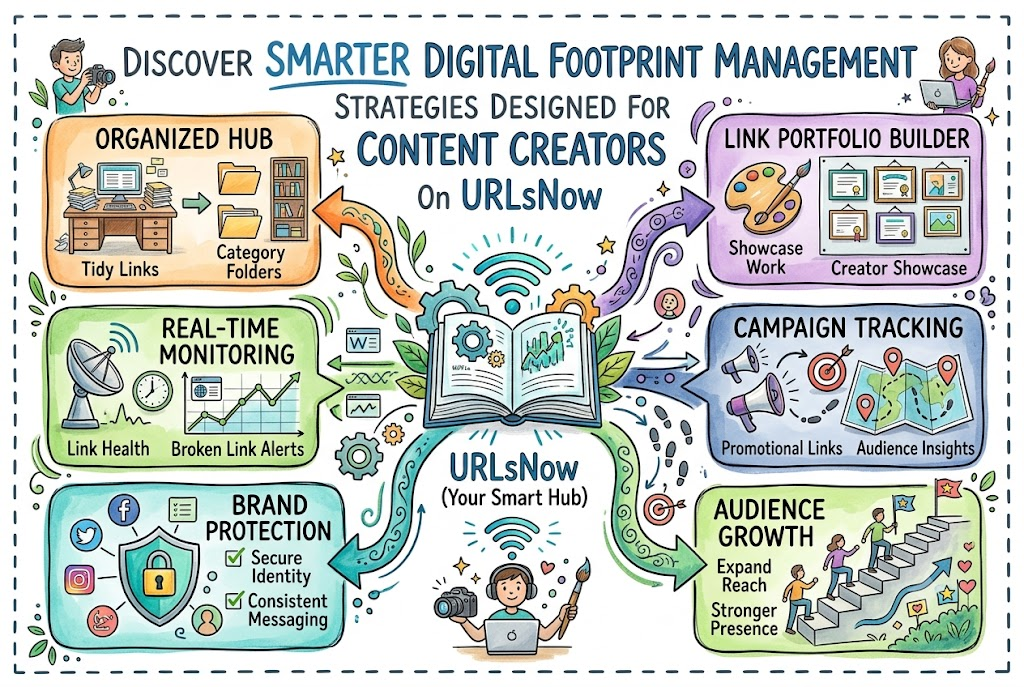
URLsNow offers an enterprise-grade link management system engineered for companies, marketing agencies, content publishers, and independent creators. The platform replaces cluttered browser toolbars with a powerful, searchable dashboard that scales alongside your digital presence. Users manage internal project files, track live promotional campaigns, and publish sleek showcase portfolios from one location. By automating status monitoring and link classification, URLsNow secures your brand reputation while simplifying daily work.
Key URLsNow Features Explained Through Real Problems
URL Management Tool
Disorganized link storage wastes valuable work hours and creates constant operational confusion. Finding specific project files across separate emails and chat apps halts daily momentum. URLsNow solves this friction by unifying all web addresses inside a secure master library. Users retrieve required files instantly, turning disorganized bookmark lists into an efficient asset center.
URL Organizer Tool
Unstructured link collections accumulate quickly, making manual visual searches tedious and inaccurate. Browsing through massive lists of unorganized bookmarks disrupts concentration and creates duplicate records. URLsNow resolves this issue by offering custom tags, nested folders, and deep search filters. Users categorize incoming resources logically, ensuring critical project data remains available in seconds.
Automatic Broken Link Monitoring
Unnoticed dead links ruin user experiences, reduce conversion rates, and hurt search rankings. Manually checking every page address across large sites consumes massive amounts of time. URLsNow solves this issue by running continuous automated status checks in the background. The system flags broken paths immediately, allowing managers to fix errors before visitors notice them.
URL Health Monitoring Tool
Unexpected server outages destroy marketing campaigns and impact sales funnels without warning. Operating without status tracking leaves teams unaware of downtime on high-value landing pages. URLsNow prevents undetected failures by actively checking server status codes and site speed around the clock. Constant oversight guarantees your conversion pages stay functional and accessible.
Campaign Link Management Tool
Marketing pushes depend on tracking parameters, custom landing pages, and affiliate links across multiple channels. Managing campaign links within messy text files leads to incorrect deployments and broken analytical tracking. URLsNow eliminates campaign chaos through structured folder hierarchies and clean redirect controls. Marketers manage ad channels safely, protecting campaign data and traffic delivery.
Link Portfolio Management
Freelancers and creators struggle to present their multi-platform achievements through cluttered lists of individual web addresses. Sending prospective clients separate links reduces response rates and looks unprofessional. URLsNow solves this presentation challenge by assembling sleek link portfolios that highlight articles, creative projects, and products. This consolidated format builds credibility while offering visitors a clean navigation experience.
Free Link in Bio Tool
Social platforms limit users to a single profile link, restricting traffic flow to products and articles. Constantly updating that single link wastes effort and creates broken pathways on older posts. URLsNow removes this restriction by providing dynamic bio pages that house every essential web destination. Creators send social traffic to multiple channels without altering their main bio profile.
Content Link Management Tool
Publishing teams handle vast libraries of published posts, media files, and reference sources every week. Content updates often create broken internal references and dead reader pathways across older articles. URLsNow resolves content distribution hurdles by providing tag systems, channel grouping, and automated link checking. Publishers audit media assets rapidly, keeping internal libraries accurate over time.
Digital Footprint Management Tool
Managing online assets across dozens of platforms makes maintaining brand consistency exceptionally challenging. Unmonitored web addresses introduce security gaps, outdated brand details, and broken public pathways. URLsNow fixes expansion risks by acting as a master control panel for your complete web network. Users monitor, audit, and secure live web addresses effortlessly from one interface.
Who Can Benefit from URLsNow?
- Digital Marketers: Organize promotional URLs, monitor campaign landing pages, track custom parameters, and secure active ad traffic.
- Content Creators: Build custom bio pages, curate creative portfolios, group social media links, and distribute content seamlessly.
- Freelancers & Agencies: Present project deliverables, build showcase portfolios, audit active client links, and share assets efficiently.
- Webmaster Teams: Detect broken site paths, monitor server HTTP responses, audit redirect chains, and protect search rankings.
- Remote Workers: Store internal tool lists, share project collections, categorize shared documents, and eliminate daily link searching.
Real-Life Ways People Can Use URLsNow
Marketing directors use URLsNow to structure multi-channel ad pushes inside clean campaign folders. Rather than searching through confusing spreadsheets during a live launch, team members access monitored dashboards that ensure every ad link leads to the correct destination.
Independent professionals employ the platform to build custom showcase pages that highlight articles, design projects, and digital products. Adding new work to their central library automatically refreshes their public profile, keeping client presentations current without duplicate effort.
E-commerce managers rely on automated status monitoring to protect sales funnels across primary checkout channels. Immediate alerts notify technical teams the moment a product page fails, preventing lost transactions and customer frustration.
Step-by-Step Guide to Organize Your URLs
Identify the URLs You Need to Manage
Audit every web address you use across personal projects, team operations, and live ad pushes. Collect saved browser bookmarks, project documents, and social profiles into an initial list to measure your complete asset volume.
Group URLs by Purpose
Sort your raw list into functional operational categories based on department, project, or target audience. Creating clear boundaries between internal research, client deliverables, and marketing pages simplifies long-term organization.
Create Categories or Collections
Build custom folders and tag structures within your dashboard to match your operational categories. Logical folder structures allow team members to retrieve specific web addresses through quick search queries rather than manual checking.
Remove Duplicates and Outdated Resources
Purge repeated records, expired promotional links, and obsolete reference pages from your system. Removing unnecessary digital clutter maintains a clean asset hub that team members navigate without confusion.
Monitor Important Links for Availability
Activate automated status tracking for critical landing pages, primary checkout funnels, and shared public assets. Automated checks notify you instantly when key web pages return server errors or go offline.
Review Redirects and Problematic URLs
Check redirect paths and response speeds to guarantee visitors land on intended pages quickly. Resolving broken redirect chains improves loading performance, protects search engine health, and delivers a better user experience.
Create a Public Link Collection When Needed
Design mobile-optimized public landing pages to share multiple resource links through a single address. Public hubs allow professionals to distribute curated content cleanly without cluttering emails or social media bios.
Review and Maintain Your URL Portfolio Regularly
Perform routine audits to add newly published work, update destination paths, and archive completed promotional folders. Consistent maintenance ensures your centralized link library stays accurate and functional.
Common URL Management Mistakes to Avoid
Relying on browser bookmark bars traps valuable links on individual devices, preventing seamless team sharing and status tracking. Fragmented storage habits slow down daily operations and increase duplicate file records across teams.
Ignoring routine link checks allows dead pages to accumulate, hurting user experience and search performance. Leaving broken pathways unchecked damages overall brand credibility and drives potential customers away from your conversion pages.
Saving links without consistent naming rules or tags converts any digital library into chaotic noise over time. Searching through unorganized lists wastes precious work hours and frustrates team members looking for critical files.
Storing high-value project addresses inside static text files prevents fast responses when site destinations change. Dynamic web operations require continuous status monitoring, automated alerts, and centralized control to run efficiently.
URLsNow vs Traditional URL Management
Traditional URL Management vs Centralized URL Management
| Feature Comparison | Traditional Management | Centralized URL Management |
| Organization | Local browser bookmarks and unstructured text files | Centralized dashboard with structured folders and tags |
| Searchability | Manual visual searching across individual devices | Instant global search with smart category filters |
| Monitoring | Zero status checking; relies on manual clicking | Automated background health checks and error detection |
| Broken Link Detection | Discovered after customer complaints or lost revenue | Continuous scanning with immediate alerts for broken paths |
| Campaign Management | Cluttered spreadsheets with unmonitored URLs | Structured campaign folders with active link tracking |
| Portfolio Management | Multiple individual links shared across separate chats | Single consolidated portfolio hubs and bio pages |
| Public Sharing | Long lists of raw links sent via email or text | Sleek, customizable public landing pages |
| Maintenance | High manual effort with frequent broken paths | Automated maintenance with real-time health visibility |
URLsNow Features and Practical Benefits
URLsNow Features vs Practical Use
| Feature | What It Does | Who Can Benefit |
| URL Management | Stores web addresses inside one secure central hub | Remote teams, agencies, and online businesses |
| URL Organizer | Groups links into custom tags and folder structures | Researchers, students, and content managers |
| Broken Link Monitoring | Scans saved links automatically to identify dead pages | SEO specialists, webmasters, and bloggers |
| URL Health Monitoring | Tracks server HTTP response codes in real time | E-commerce owners and performance marketers |
| Campaign Link Management | Structures and tracks promotional launch URLs | Ad agencies and digital media buyers |
| Link Portfolio Management | Displays published work inside sleek showcase pages | Freelancers, consultants, and writers |
| Link in Bio | Unifies destination links behind one mobile bio page | Social influencers and content creators |
| Content Link Management | Maintains structural links across publishing sites | Editors, publishers, and content strategists |
| Digital Footprint Management | Audits complete online web assets from one panel | Brand managers and business owners |
Key Benefits
- Centralizing web assets removes daily searching delays and speeds up project execution across teams.
- Automated status checking catches dead links instantly, protecting your brand reputation and search ranks.
- Structured campaign folders guarantee marketing teams deploy accurate ad links without losing tracking data.
- Custom link portfolios help freelancers present their work professionally to prospective clients.
- Real-time server checks safeguard sales funnels by alerting managers to site downtime before conversions drop.
- Complete digital footprint oversight provides absolute control over dynamic online assets across all channels.
Frequently Asked Questions About URLsNow
How do centralized link platforms drive organizational productivity?
Centralized systems aggregate every web destination into a single searchable dashboard, ending time lost to buried local bookmarks.
Why do automated health checks outperform manual link verification?
Automated systems monitor destinations around the clock, catching server errors long before broken pages hurt sales or organic search rankings.
Can users build multi-tiered folder systems for large projects?
Yes, teams structure saved resources using custom tags, nested directories, and category filters to locate assets instantly.
How does the system simplify complex ad campaign tracking?
Marketers store tracking parameters inside structured campaign folders, protecting data integrity and verifying landing page functionality.
How do dynamic portfolio pages elevate personal branding?
Independent professionals assemble articles, projects, and products into a single polished showcase page that delivers an outstanding client experience.
What system notifications fire when a target page drops offline?
The health monitoring system identifies HTTP status errors immediately, sending alerts so administrators can repair or replace broken links.
Can cloud link infrastructure fully replace local browser bookmarks?
Yes, cloud dashboards ensure organized link libraries remain instantly accessible across any desktop or mobile browser.
How does a single bio landing page improve social distribution?
Bio pages display multiple interactive buttons behind one master profile link, routing social followers directly to key products and content.
Why do traditional spreadsheets fall short as long-term link repositories?
Spreadsheets offer zero automated status checks, suffer from duplicate entry errors, and fail to alert users when destination paths break.
How does centralized management secure an enterprise digital footprint?
Central control panels give organizations complete visibility over live web assets, ensuring public pathways remain accurate and fully operational.
Final Thoughts
Relying on manual methods to track growing collections of web addresses creates immediate operational limits as your online operations expand. Disorganized storage causes lost productivity, hides broken pages, and creates a fragmented brand experience that frustrates visitors. Adopting a dedicated platform to organize, monitor, and distribute your links establishes the clarity needed to maintain top performance.
Combining real-time status alerts, customizable folder hierarchies, and public bio pages positions URLsNow as an essential hub for modern digital management. Organizing your web infrastructure removes everyday friction, guards high-value promotional traffic, and keeps your entire digital presence running smoothly.
